
 AED

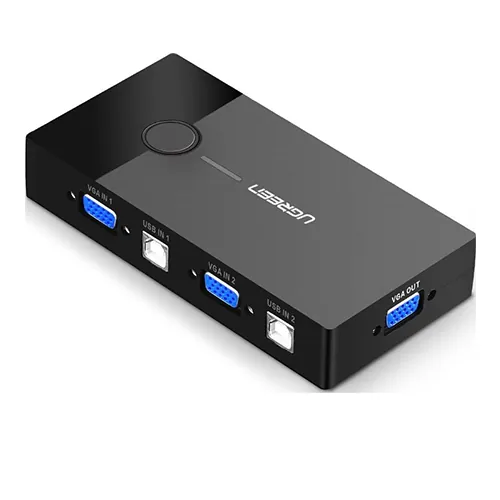

Ugreen 2 In 1 Out USB VGA KVM Switch-Video Sharing Adapter, Control 2 PC on 1 Monitor, Stable Data Transmission, Black | 30357
AED 380.00
Ugreen 2 In 1 Out USB VGA KVM Switch-Video Sharing Adapter, Control 2 PC on 1 Monitor, Stable Data Transmission, Black | 30357
Shop UGREEN USB VGA KVM switch in UAE now! Share VGA display and USB peripherals between two computers. Dubai's cost-effective solution for dual-PC setups in control rooms.
- BRAND: UGREEN
- MODEL: 30357
- DEVICE_TYPE: VGA_KVM_SWITCH
- COMPUTER_INPUTS: 2
- MONITOR_OUTPUTS: 1_VGA
- USB_SHARING: SUPPORTED
- CONTROL: ONE_KEYBOARD_AND_MOUSE_SET
- VIDEO_SHARING: SUPPORTED
- MAX_RESOLUTION: VERIFY
AED: 380.00
Description
UGREEN 2 Port USB VGA KVM Switch - 2 Computers 1 Monitor 1920x1440
The UGREEN 2 In 1 Out USB VGA KVM Switch allows users to control two compatible computers using a single VGA monitor, USB keyboard, and mouse. Designed for office workstations, IT maintenance, home computing, and business environments, this KVM switch simplifies switching between separate computer systems without repeatedly reconnecting display and peripheral cables.
With advertised VGA resolution support up to 1920x1440, manual computer selection, and compatibility with Windows, macOS, and Linux systems, the UGREEN 2 Port VGA KVM Switch provides a practical solution for sharing essential workstation equipment between two computers.
Control Two Computers with One Monitor, Keyboard and Mouse
The UGREEN USB VGA KVM Switch features a two-computer, one-display configuration that allows users to operate separate computer systems through a shared workstation.
Instead of maintaining a dedicated monitor, keyboard, and mouse for each computer, users can connect compatible peripherals through the KVM switch and select which computer they want to control.
This arrangement is useful for offices with multiple desktop computers, IT technicians managing different systems, and home users working with separate personal and business computers.
Only one connected computer is displayed and controlled at a time. The KVM switch does not combine two computer desktops or display both systems simultaneously.
VGA Resolution Support Up to 1920x1440
The supplied product specifications advertise VGA video resolution support up to 1920x1440.
This enables the switch to transmit compatible analog VGA video signals for office applications, system administration, document processing, and other everyday computing tasks.
Actual display resolution and image quality depend on the connected computer's VGA output, monitor capabilities, cable quality, and supported refresh rate.
Because this product uses VGA video connectivity, it should not be confused with HDMI, DisplayPort, or USB-C video switches. Computers without VGA output may require a suitable active video converter.
Convenient Button Switching Between Computers
The UGREEN 2 Port USB VGA KVM Switch is described as featuring a manual button for selecting the active computer.
Users can change between two connected systems without disconnecting their VGA monitor, keyboard, or mouse.
For example, an IT technician can operate one computer for software installation and then select another system for troubleshooting while using the same workstation peripherals.
The monitor signal and USB devices may briefly reconnect when switching between computers, depending on the connected equipment.
USB Keyboard and Mouse Sharing
Alongside VGA video switching, the UGREEN KVM switch is designed to share compatible USB keyboard and mouse connections between two computers.
This allows users to maintain one set of input devices rather than repeatedly moving USB cables between systems.
The exact USB port configuration, supported USB versions, and compatibility with specialized gaming keyboards or other peripherals should be confirmed against the manufacturer's specifications for the selected model.
Unlike a general-purpose USB sharing hub, a VGA KVM switch also manages the selected computer's video connection.
Compatible with Windows, macOS and Linux
The supplied product description identifies compatibility with Windows, Mac, and Linux operating systems.
This makes the UGREEN VGA KVM Switch relevant for workstations using different operating environments, provided the computers have compatible VGA video and USB connections.
Standard keyboard and mouse functionality may operate using the operating system's existing drivers, although specialized peripherals and system configurations may have additional requirements.
Users should verify compatibility with their specific computer hardware and operating system versions before installation.
Organize Your Office or Home Workstation
The UGREEN USB VGA KVM Switch can help simplify desk arrangements where two computers are used regularly.
By sharing one monitor and a single set of input peripherals, users can reduce the need for duplicate workstation equipment.
This can be useful in compact office desks, computer maintenance areas, training environments, and home workstations with limited space.
Each computer still requires appropriate video and USB connections to the KVM switch, so users should plan cable routing and confirm the required accessories before installation.
Practical Solution for IT Support and System Maintenance
VGA KVM switches can be particularly useful when working with compatible desktop computers, older workstations, and equipment that provides native VGA video output.
IT departments and technical support teams may use a shared monitor, keyboard, and mouse to access two separate systems during configuration, troubleshooting, or maintenance.
The UGREEN 2 Port VGA KVM Switch provides local computer switching rather than remote network management.
Users managing servers or computers without compatible VGA and USB connections should confirm their hardware requirements before selecting this device.
Simple Installation for Compatible Computers
To install the UGREEN USB VGA KVM Switch, connect the VGA video and required USB connections from both computers to the corresponding KVM inputs.
Connect a compatible VGA monitor, USB keyboard, and mouse to the appropriate shared output ports.
Use the switcher's manual selection button to choose the active computer.
The exact cable types, included accessories, and power requirements depend on the manufacturer model and retail package.
Who Should Consider the UGREEN 2 Port VGA KVM Switch?
- Office Professionals: Share one monitor, keyboard, and mouse between two compatible desktop computers.
- IT Technicians: Switch between computers during software installation, diagnostics, and maintenance.
- Home Office Users: Manage separate personal and work computers from one desk.
- System Administrators: Access compatible local computer systems using shared input peripherals.
- Educational Facilities: Organize workstations that require access to two separate computers.
- Business IT Buyers: Source VGA KVM switching equipment for compatible workplace hardware.
UGREEN 2 In 1 Out USB VGA KVM Switch Key Specifications
- Brand: UGREEN
- Product Type: USB VGA KVM Switch
- Computer Connections: 2
- Monitor Outputs: 1 Shared VGA Display
- Video Interface: VGA
- Maximum Advertised Resolution: 1920x1440
- Keyboard Connection: USB
- Mouse Connection: USB
- Switching Method: Manual Button
- Active Computers: 1 at a Time
- Operating System Compatibility: Windows, macOS and Linux - As Advertised
- Video Signal Type: Analog VGA
- Simultaneous Dual-Computer Display: Not Supported
- Connection Type: Wired
- Recommended Applications: Office Workstations, IT Support and Home Computing
- USB Version: Confirm Exact Manufacturer Model
- Included Cables: Confirm Retail Package Contents
- Power Requirements: Confirm Exact Manufacturer Model
- Warranty: Confirm Applicable Manufacturer and Seller Terms
Frequently Asked Questions
Q: What does the UGREEN 2 Port USB VGA KVM Switch do?
A: It allows two compatible computers to share one VGA monitor, USB keyboard, and mouse. Users select the computer they want to control using the switcher's manual button.
Q: What resolution does the UGREEN VGA KVM Switch support?
A: The supplied product specifications advertise VGA resolution support up to 1920x1440. Actual output depends on the connected computer, monitor, and cables.
Q: Can I connect two computers to one monitor?
A: Yes. The KVM switch allows two compatible computers to share one VGA display, with one computer selected at a time.
Q: Does the UGREEN VGA KVM Switch support HDMI monitors?
A: The supplied description identifies VGA video connectivity. An HDMI-only monitor would require an appropriate active VGA-to-HDMI conversion solution, subject to compatibility.
Q: Can I use one keyboard and mouse for both computers?
A: Yes. Compatible USB keyboards and mice can be shared between the two connected computers through the KVM switch.
Q: Is this KVM switch suitable for office and IT maintenance use?
A: Yes. It is designed for compatible workstations where users need to alternate between two computers using shared VGA and USB peripherals.
Buy UGREEN USB VGA KVM Switch 2 Port in UAE
BLUMENiT supplies KVM switches, VGA adapters, HDMI switches, computer cables, monitors, networking equipment, and other IT hardware for individual customers, corporate buyers, and wholesale procurement.
Customers in Dubai, Abu Dhabi, and Sharjah can enquire about the UGREEN 2 In 1 Out USB VGA KVM Switch for office workstations, computer maintenance environments, and business IT installations.
For assistance checking VGA compatibility, supported monitor resolutions, USB connections, or selecting an alternative HDMI KVM solution, contact the BLUMENiT team.
Visit BLUMENiT Contact Us for product information and wholesale enquiries. Final specifications, package contents, availability, pricing, warranty coverage, and delivery arrangements are subject to confirmation.
Dual PC VGA KVM Switch for Seamless Workspace Control UAE
UGREEN 2 In 1 Out USB VGA KVM Switch | Video Sharing Adapter for Dual PCs ? BLUMENIT UAE solves the frustration of constantly unplugging cables between two computers sharing one monitor and USB peripherals. Designed by Ugreen, it delivers a simple plug-and-play setup for VGA video and USB control switching, making it easy for both Windows and macOS users, and it pairs well with setups like the Ugreen 10 In 1 Usb C Docking Station. Unlike older unmanaged switching setups that require manual cable swapping and cause desk clutter, this KVM switch centralizes control into a single button or toggle, reducing downtime and confusion. The UGREEN 2 In 1 Out USB VGA KVM Switch | Video Sharing Adapter for Dual PCs ? BLUMENIT UAE ensures stable signal handling for dual PCs without lag or signal drop. Q: Can I use it with two desktops at the same time? A: Yes, it is designed specifically for two PCs sharing one display and USB peripherals, switching instantly between sources. It also offers reliable build quality and consistent VGA output, making it ideal for office desks, home labs, or customer service stations requiring frequent switching. With the UGREEN 2 In 1 Out USB VGA KVM Switch | Video Sharing Adapter for Dual PCs ? BLUMENIT UAE, you get a practical solution that reduces cable wear and improves workspace organization. It is a dependable upgrade for users moving away from basic splitter solutions that do not allow true input switching control. Overall, it streamlines multi-PC workflows efficiently and keeps your desk setup clean and manageable.
Specifications
Specifications:
Warranty Information
Basic Information
Reviews (0)
Related Products
 QUOTE FOR CORPORATE
info@blumenit.com
 B2B
info@blumenit.com
 INCLUSIVE VAT
All prices include VAT